Using the Xilinx ISE Design Suite 14.7 version

Guest #3844574
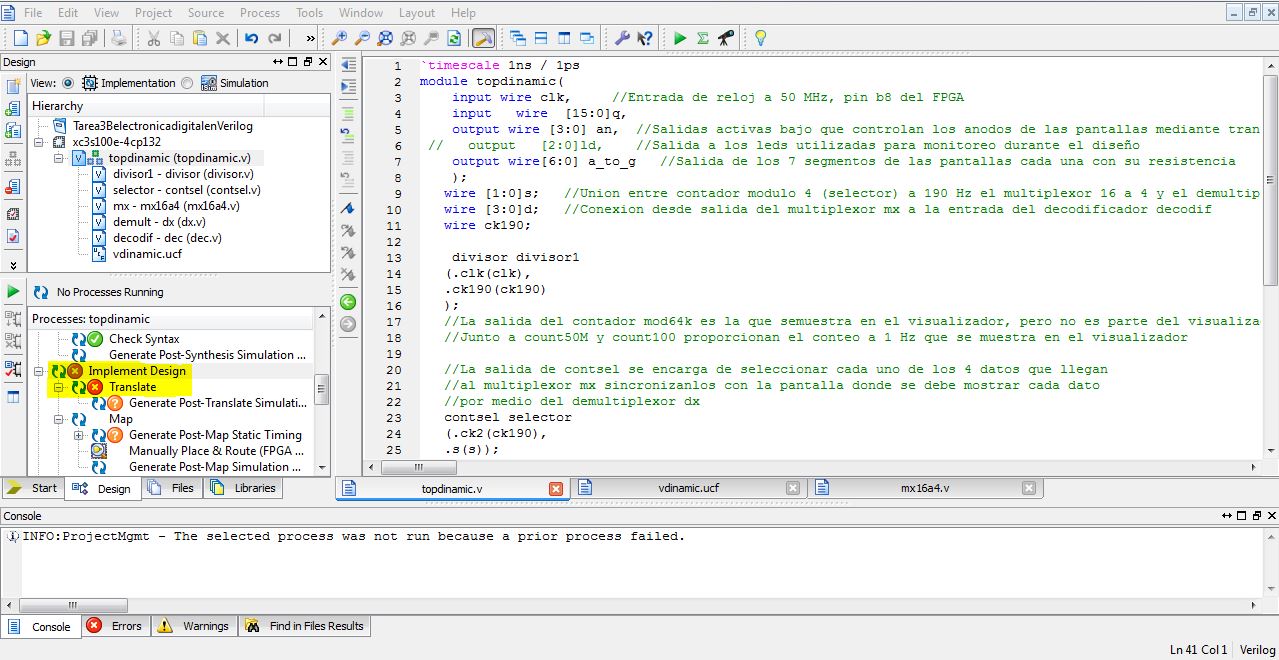
I am using a Xilinx Spartan 3E-100 Basys2 module in order to make a 
design corresponding to a dynamic display circuit into the ISE design 
suite program (14.7 version), however when generating the program file, 
when I start to make a synthesis of the main program and its modules it 
returns me two errors and It says that one of them corresponds to the 
part of implementation of design, and the other to the translation of 
the program. If someone could help me find out why this happens or what 
would be the typical reasons why such errors occur, it would be really 
helpful.
Attached files:
Guest
klick on the Error tab, so everyone (including you) sees the actual 
error description.

And maybe you first work through some ISE Tutorials sometime...
Guest
Forgive me for the response again, well about the error it actually 
says:

"#3/Dinamico/dinamico.ucf(22)]: NET "btn<3>" not found. Please verify 
that: 1. The specified design element actually exists in the original 
design. 2. The specified object is spelled correctly in the constraint 
source file".
Guest
Juan,
Obviously you're lacking fundamental knowledge of FPGA development. You 
should find Demo-Projects for your Xilinx Spartan 3E-100 Basys2 module 
and use these to learn what's going on in .ucf files, during Synthesize, 
Translate, Map, Place&Route,...
Your (current) error is, that your .ucf file tries to constrain a signal 
called btn<3> (probably to a PIN location or maybe a timing net). But 
such a signal (wire) does not occur in your code (i.e. input/output 
list)

Reply

A question of your own? This thread is over 12 years old. Ask it in a thread of its own – more people read along there, and it gets answered more often and sooner.

Start a new thread

A fix, an addition or feedback on this thread? Then reply here.

Formatting
  • [c]C-Code[/c]
  • [vhdl]VHDL-Code[/vhdl]
  • [code]code in other languages, ASCII drawings[/code]
  • [math]formula (LaTeX syntax)[/math]
  • [[Title]] – link to an article
  • Link to another post: right-click its post ID (#8078628), copy the address, paste it into the text

More about formatting

Post long source code as an attachment, not in the text.

Already registered? Log in

Not shown to anyone. We send you a link; your post appears once you confirm it there.

By submitting you create a free account and accept the terms of use.