how can I read protect my STM32F4 with eclipse + openOCD JTAG ?

Guest #3159470
Rate this post
useful
not useful
hello Spencer ,

first of all thank you for your answer

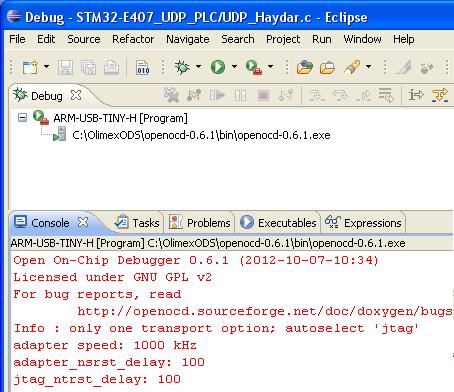
in the attachment the screenshot of my Eclipse

1) how can I upgrade this to 0.7.0 ?

2) should  I type "stm32f2x lock 0" in the console window ?

3) "power cycle may be required" - you mean power off and then on ?

4) I have stm32f4 - but your answer "stm32f2x" - is the command equal 
for both f2 and f4 ?

thank you
Attached files:
#3159510
Rate this post
useful
not useful
magnetron wrote:
> hello Spencer ,
>
> first of all thank you for your answer
>
> in the attachment the screenshot of my Eclipse
>
> 1) how can I upgrade this to 0.7.0 ?
>

depends in your OS, for windoze you could try here - 
http://www.freddiechopin.info

>
> 2) should  I type "stm32f2x lock 0" in the console window ?
>

yes or in gdb or a script.

>
> 3) "power cycle may be required" - you mean power off and then on ?
>

yes

>
> 4) I have stm32f4 - but your answer "stm32f2x" - is the command equal
> for both f2 and f4 ?
>

yes

Spen
Guest #3163830
Rate this post
useful
not useful
hello Spencer,

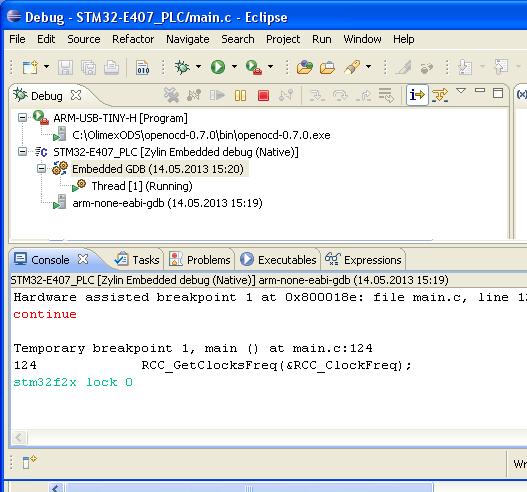
I downloaded unzipped and copied openocd-0.7.0 folder
into OlimexODS folder

first error olimex_stm32_e407. file was missing in \scripts\board 
directory
I copied this file from 0.6.1 into 0.7.0

then I run Eclipse chosen ARM_USB_TINY_H  and as you see
openocd-0.7.0.exe recognized the JTAG

afterwards I downloaded my code in my Olimex Board

I typed stm32f2x lock 0 in the console window

the console screen you can see in the attached picture

there was no acknowledgment of read protection

I tried to download my code again and there was no warning that
the uC is read protected

what am I doing wrong ?

thank you
Attached files:

Reply

Please log in before posting.

or

Log in with Google account

Registration is free and takes only a minute.

Register now