USB-C Pinout for power adapter

Guest #7207034
Rate this post
useful
not useful
The UCB-C plug of my power adaptor for Star LapTop notebook is broken.
I bougt a 65 W Lenovo power supply that works nicely, but I want to 
repair
the old one as a backup.
The old plug has got a cable with three wires: black for ground,
white for VBUs, blue for configuration.
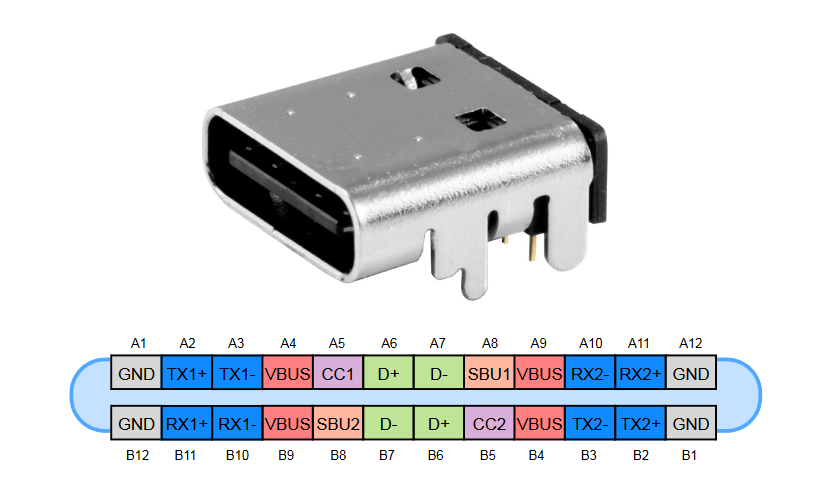
I guess I need to connect the black wire to A1, A12, B12, and B1.
The white one to  A4, A9, B4, and B9.
The blue one to A5 and B5.
Now my questions:
Is this correct?
Do I need to add any resistors?

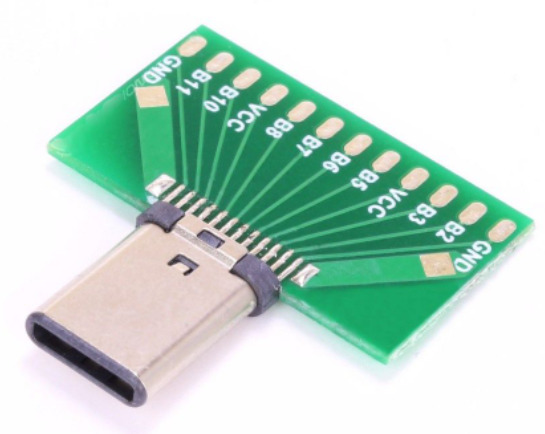
The only plug I found that provides access to the pins needed is shown 
in the picture attached.

Thanks for any advice,

ulrich
Attached files:
#7242149
Rate this post
useful
not useful
Hello. That's not so easy. If you connect only VBUS and GND your laptop 
will (probably) not charge. That's because USB C can provide a wide 
range of voltages (from 5V to 20V, up to 100W iirc). To do so the host 
and the device negotiate the appropriate voltage through what's known as 
USB PD (power delivery). The Vbus starts at 5V and then the laptop asks 
for the most appropriate voltage (usually close to 20V). Several pins on 
the connector are involved in USB PD, so the easiest and safest way to 
restore your laptop is to solder another USB C connector. If your laptop 
comes with more than a USB C connector you can charge it via the 
other(s).
#7255354
Rate this post
useful
not useful
@MATYU
You write:
   so the easiest and safest way to
   restore your laptop is to solder another USB C connector.

You misunderstood the problem. There is no problem at all with the 
laptop.

The problem is, that the USB-C plug of the power adaptor is broken and 
the question was, how to connect the three wires that go out of the 
power adaptor
to a new USB-C plug. Wired plugs, I have seen only with two wires.

Reply

Please log in before posting.

or

Log in with Google account

Registration is free and takes only a minute.

Register now