Materials to be used

1、STONE STWI101WT-01

2、FTP thermal printer head

3、Raspberry Pi pico

4、Coin-operated machine

Function

The control function is displayed on the serial screen, the main
interface selects the floor, after entering the main interface selects
the parking space, at the same time it will display the parking space
number in the text box on the top right, then selects the stay time, it
is two scrolling text selectors, then also the same will display the
order information in the text box on the top right, according to the
fixed unit price which multiplies with the stay time to get the total
price. Then only when the parking space and the stay time are selected,
you can go to the payment button, otherwise it is invalid. After
entering the payment screen, a coin acceptor will be used. Then the
screen will show the number of coins to be put in and the number of
coins already put in. After the coins have been put in, a payment
success message will be displayed. Then you can choose to print a small
ticket to print the place number and time on the thermal paper.

Circuit

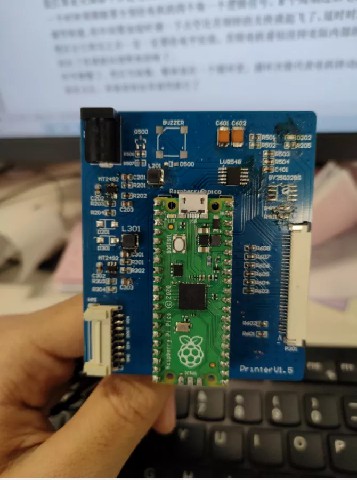
I have design a circuit by myself in order to drive many components, and
the overall circuit diagram is like this, the upper left corner is the
communication socket and power supply socket, below there is a buzzer
(not actually used in the circuit), there is a light-emitting diode on
the right, and the lower right corner is a 30pin fpc for connecting the
print head.
Attached files:
-
 parking-management-system_6_.jpg
(46 KB)
parking-management-system_6_.jpg
(46 KB)