Hi!
I have problem with NanoBoard 3000... I am trying to enable the VGA out
but with no success... Anybody worked with this great board?

Thank You!
Guest
#2333290
What ist your real problem? How did you try to enable the VGA output?
Did you try an example design? Or your own design? As I can see in the
data sheet the NanoBoard 3000 use a video DAC (THS8134B) to convert the
digital color data into analoge values. So you just need to generate VGA
conform signals...

Maybe this link give you some hints:
http://www.johnloomis.org/altera/DE2/vga.html

Duke
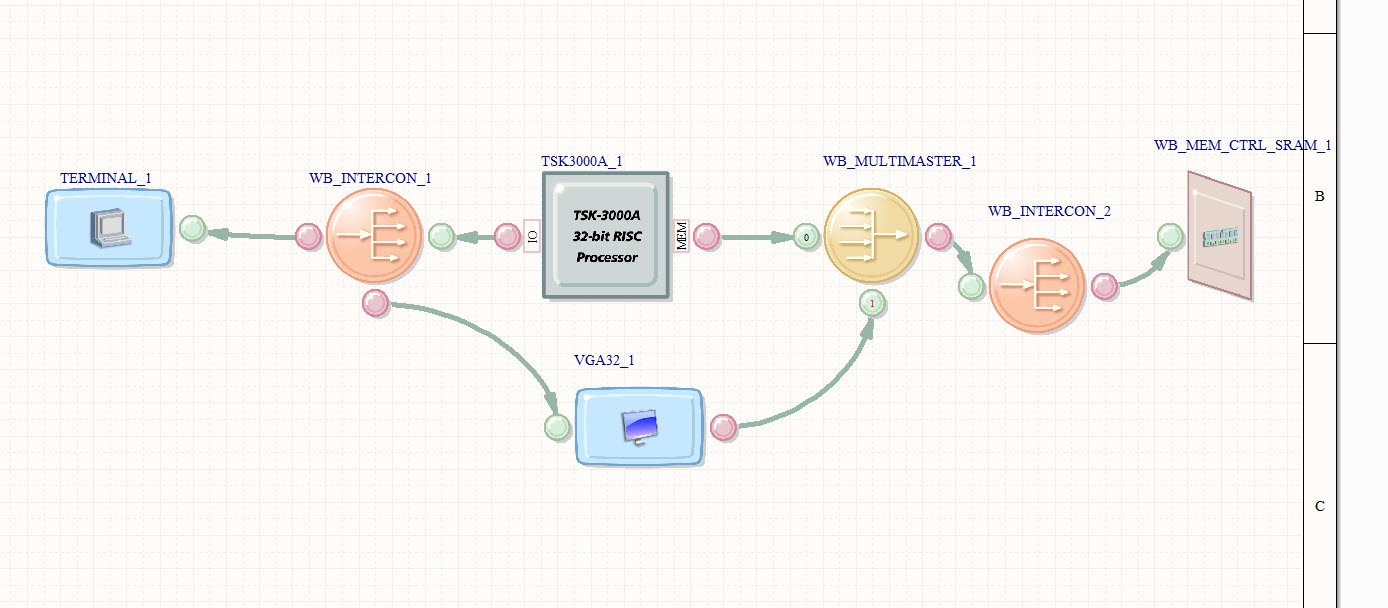
You have openbus, schematics and error that i have...

Compiling of openbus and schematic goes without any errors but when i
compile the whole project i get the error...
Attached files:
-
 schematics.jpg
(200 KB)
schematics.jpg
(200 KB)
-
 openbus.jpg
(140 KB)
openbus.jpg
(140 KB)
-
 error.jpg
(19 KB)
error.jpg
(19 KB)


Guest
#2333498
The error look's like using the name "VGA" twice (or more) for diffrent
things. Can you rename one of you schematic?

Duke
Yeah! Thats the problem :) thank You, friend :)

I have more questions, but ill ask later, when i start working on that
part of project :)

THANK YOU!!!!
I have another problem with synthesize...:/
Attached files:
-
 error.JPG
(52 KB)
error.JPG
(52 KB)

Guest
#2334627
Your promlem is written there:
1 | |
Somewhere in your System1 or Sheet1 or elsewhere is a memory or a fifo.
But it is defined with to much elements (262144 = 2^18 = 18 bit wide).
Try to reduce this.

Your approach show me, that is was right to abandon this altium stuff.
It looks really nice, but hide the complexity of the underlying tools.
So first try to get things done without altium and later you can
switch to use the fine assistances from altium...

Duke
What did You mean by "So first try to get things done without altium"? I
think i cant do this without altium :(
Guest
#2334681
I do all my (VHDL) development with the vendor tools (Xilinx in my
case). It can even be used with altium hardware.

What is your goal? Why are you fixed on altium?

Duke
I have a project on University for my 1st year on PhD. Its NanoBoard
3000 and the only tool that i have here is Altium Designer 9... This is
my first contact with FPGA...

I have in sheet1 18bit memory...
Guest
#2334808
> the only tool that i have here is Altium Designer 9
That's not true. There is some underlying tool from the FPGA vendor.
What flavor of Nanoboard 3000 did you have?

> This is my first contact with FPGA...
I see.

> I have in sheet1 18bit memory...
It seem's to big for your FPGA.

Duke
NanoBoard 3000XN – Xilinx variant, incorporating a Xilinx Spartan-3AN
device (XC3S1400AN-4FGG676C)


this is the memory on the NB3000
http://www.issi.com/pdf/61lv25616al.pdf
Guest
#2335913
> I have in sheet1 18bit memory...
This is internal memory.

> this is the memory on the NB3000
> http://www.issi.com/pdf/61lv25616al.pdf
This is external memory. You need an SRAM memory controller for that.

Duke
In openbus scheme I have sram controller for that external memory...
One more question... Is it possible for fpga to display .avi or any
video files over VGA?
Guest
#2369134
> Is it possible for fpga to display .avi or any video files over VGA?
Sure. But try to make small steps:
* static VGA screen
* uncompressed picture on VGA screen
* compressed picture on VGA screen
...

I don't know the avi-algorithms, but for sure it's not easy to implement
them in pure hardware.

Duke