FT2232H in FT245 FIFO Mode - burst not working

OP #2255991
Rate this post
• ▲ useful
▼ not useful
Hi!

I am trying to burst data out of my Cyclone II via a FTDI FT2232H -Chip 
in FT245 FIFO mode (see FT245_fifo.png) as described in the FTDI 
Application Node 130 (see burst.png):
1
A write operation can be started when TXE# is low. WR# is brought low when the data is valid. 
2
A burst operation can be done on every clock providing TXE# is still low. The external system must monitor TXE# and its own WR# to check that data has been accepted. 
3
Both TXE# and WR# must be low for data to be accepted.

Debugging my design shows me, that the signal sequences fit the 
desciption (see ft232_burst.png), but I only receive 1 byte at the PC 
side, in fact the last one that is on the bus before WR# goes high (or 
WR_int low).

What am I doing wrong? Am i missing simething?

Cheers

Thomers
Attached files:
Guest #2259304
Rate this post
• ▲ useful
▼ not useful
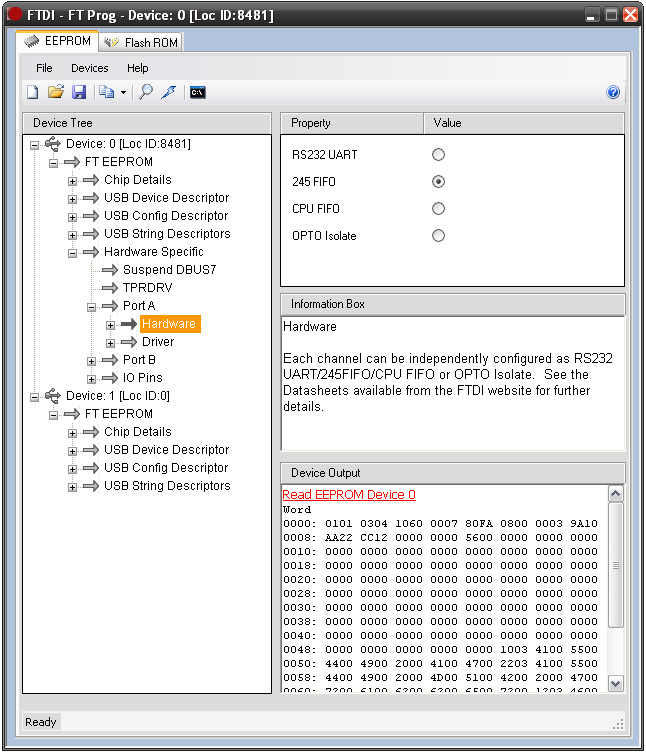
Did u set the 245 mode?
You have to have an external eeprom connected to the 232H and this 
eeprom must be programmed using the FTDI tools provided (the download 
page is a mess and afaik there is only a windows exe)
Guest #2273376
Rate this post
• ▲ useful
▼ not useful
Hi Thomas,

I hope the topic is still active. Two things

1. OpenCores has an example for the Cyclon II with the FIFO
2. Did you set the FIFO mode in both Mode section in the EEPROM? Can you 
see the 60 MHz Clock? If yes then you are in the sync FIFO mode-

Steffen

Reply

Note: the original post is older than 6 months. Please don't ask any new questions in this thread, but start a new one.

Formatting
  • [c]C-Code[/c]
  • [vhdl]VHDL-Code[/vhdl]
  • [code]code in other languages, ASCII drawings[/code]
  • [math]formula (LaTeX syntax)[/math]
  • [[Title]] – link to an article
  • Link to another post: right-click its post ID (#8078628), copy the address, paste it into the text

More about formatting

Post long source code as an attachment, not in the text.

Already registered? Log in

Not shown to anyone. We send you a link; your post appears once you confirm it there.

By submitting you create a free account and accept the terms of use.