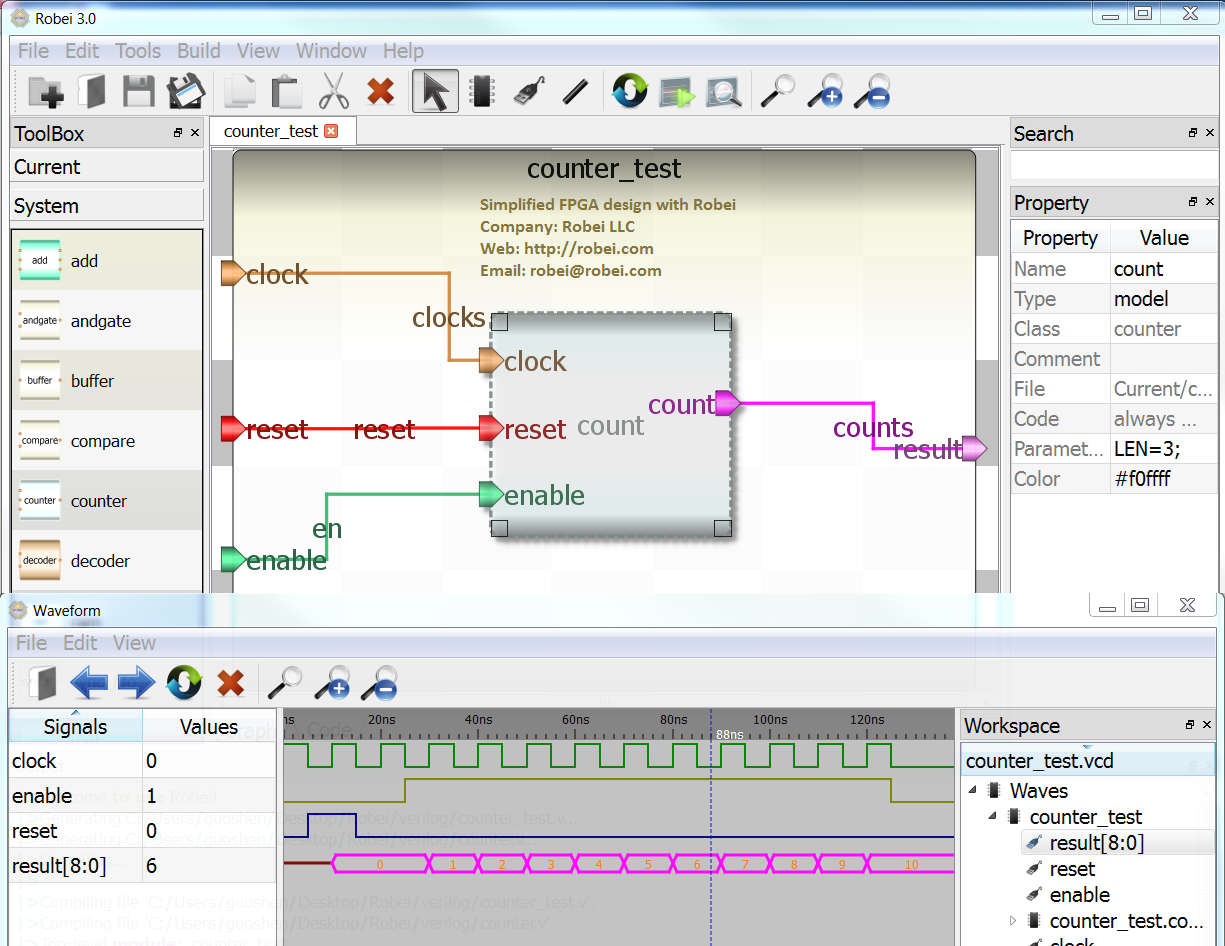
Robei aims to simplify FPGA design procedure and let everyone to play
with FPGA. It introduced a brand new visual design method for fast
prototyping by combining advatanges from both graphical design and
coding. Each of your design can be considered as conceptual chip inside
FPGA, and can be reused at any time.

◦Robei is very user friendly and easy to learn. First time users can
easily manage it in fifteen minutes.
◦Robei provides code generation on structural level, which can reduce
coding mistakes and increase productivity. In addition to that, Robei
also provides an integrated code editor for verilog coding directly.
This feature opens the door for complex design.
◦Robei is cross platform. It works on Windows, Linux, Mac OS and
Android. It is also the first FPGA simulation tool that can work on
embedded platforms. You can design at anywhere with Robei.
◦Robei is the world smallest EDA tool for FPGA design and simulation. It
has only 4.5 Mbits.
◦Robei’s waveform viewer is small, efficient, modern and user friendly.
For example, different colors are used to differentiate waves near to
each other.
There are so many new features going on, why not try it for yourself for
free.

http://robei.com
^_^ That is my fault. I already changed in the website.
Thanks for pointing it out.
Lothar Miller, do you want a license? If you need, just let me know.I
want to give you a license for your help.
You will get more than that. Robei seems have Graphical design
interface, and can generate code for you which reduced coding and
mistakes. It is cross platform software, even can work on your tablet.
The concept of Robei is simplify FPGA design based on modular design.
On the one hand there might be simplification, but there are also
obstacles. I'd prefer I design method wich is more flow based and not
physical because physical entry like schematic entry with boards
vanisches!

My Questions:

Can Robei import VHDL and help to manage the entites?

I am using Mentor HDL Designer, which is also a huge tool, but where I
only make use of entity managing and maintainance (like so many
designers).

For me it is useless to instatiate counters, comparators and such
things, because a copy and paste action of a simple HDL line will do the
same!
Robei only supports verilog. Instatiate works for all verilog models,
besides that, Robei provides visual design on structure level and code
design on algorithm. All visual design will generate code and integrate
with your algorithm code together.
What I really need:

Automatic calibration of delays and signal generation in pipelines.


If I join eqaution output, It is allways necessary to add delays
manually and calculate them.

Also when algos are set to pipelins, the correct values have to be
joined so, delays must be added and copies of signals have to be
invented.

See here:

Y = (a*k) + b * (t-c)

it will be:

step 1:)  a_1 <=a;  b_1 <=b;  k_1<=k;  t_1 <=t;  c_1 <= c;

step 2:)  temp1_2 <= a_1 * k_1;  b_2 <= b_1;  temp2_2 <= t_1 - c_1;

step 3:)  temp1_3 <= temp_1_2 ;   temp3_3 <=  b_2  *  temp2_2;

step 4:   result_4 <=   temp1_3  + temp3_3;

it is necessary to have copies of the used signal with suffixes

but: if you change the formla or add some registering, all the suffixes
change

Q:

Ca robei perfom this automatically???
Robei is a design tool based on verilog language. It is a behaivoral
simulation tool, not a synthesis tool. It will using visual design
method to help you reduce coding and manage your project well.
   If you can write your design in verilog, it will work in Robei.
Robei is focusing on reduce coding and increase visualization. It is not
focusing on research for algorithms.
   The new version 3.1 is out, with less bugs and more features.
   http://robei.com
I acknowledge your work but stink that block based design entry alike
the former logic level entry with and-or- symbols is completely
outdated. We are reaching the state to leave that behind us. VHDL and
VERIOLG gives us all to command the synthesis tool in terms of
functional description, not architectural. Architectures change.

So using logical symbols as a representative for functions is not
appropriate.
Hi Mirco,
   Thanks for your commit. Schematic based design is out of date. But
block based design is not. Robei combines the advantages of block based
design and code input method. Pure block design is out of date, but Pure
code design is not good for visualization. That is why in Robei, we use
Block based design for structure level,code input for algorithm.
my Impression

robei can help if there are Standard well tested blocks for signal
processing, math, physics Geometrie and so on

i expected that also from labview, there was not

than i expected this from hdl designer, there was not

i also expected that from matlab simulink, there ist not (really) , well
there are blocks but only wrappers for xilinx cores

ok, i also expected this from diamond ide (www.3lcom) nochance, nothing
at all

latest try i expected this from vivado, it was a lough finally

now, should i expect that from robei?
Robei is a design tool for cross platforms without any dependency on any
chips. So your design can generate verilog code which can work with
Xilinx, Altera and Actel tool.

  Most of CZM mentioned tool can use code from Robei, but not the other
way. Robei aims to be a higher level over the other tools.
From the website, Robei is a visual design tool for entry to middle
level engineer. It aims to use visual interface to help engineer to
quickly manage Verilog language. The features of Robei will increase
step by step, and cooperate with other EDA tools. Thanks for CZM
suggestions, we will try to work with the company you mentioned.
Currently it only have Android version, no Ipad version. There is one
survey shows 80% people want to try on mobile platform for EDA design.
Android tablet like Nexus 7 is good enough to run Robei and design.
Welcome to try.
> Robei aims to be a higher level over the other tools.
this is right a (too ?) strong intention i confess

fpga vendors drive their toolchain into a direction of a complete design
suite and the more people go with internal controllers like available in
the newer fpgas, the more dependencies will occur

there will be low demand for a tool covering tools and organizing gnral
hdl

> manage Verilog language
any plans to provide als vhdl?

verilog is outdated
I downloaded it for my 5" 854x480 tablet phone and couldn't do anything.
The desktop interface does not help in such a small device. When you say
that it works in Android you should also say that if you don't have a
big screen and a mouse it is unusable. I mean, multiple frames/dockable
windows ! Incredibly huge fonts for the screen size, hidden toolbar
icons ?
Editor: it needs a font like Monaco or Courier with fixed width, not a
proportional font. The built-in keyboard takes half of the screen...
think about that when designing a text editor.
Output window... impossible to read anything as it gets obscured by the
keyboard when you tap on it or try to scroll, something that doesn't
work anyways.
Language: please use proper English, the error messages are hard to
decipher as I don't speak chinese, please get a Professional Consultant
here.
Trying to run a simple testbench fails because the filename seems not to
be the same as the module name, really ? seriously ?. Get that fixed,
please.

The interface is unusable in its current form; if it is going to be
advertized as modeling on the go, then an external keyoard shouldn't be
needed, and a desktop interface doesn't cut it either. You have to
rethink the whole concept. Maybe all those dockable windows can be
Tabs... then you have full screen for all of them...

Well, it was worh a try.

Best Regards,

Ale
@Markus W.

Are you really going to write with a pencil ? that low tech thing cannot
even correct grammatical errors !
or...
How can you do FPGA development in anything but a Blue Gene ? Unless you
have 40000000000000000 eq. gates you don't do serious FPGA
development...

btw, my test bench only had an inverter... much more is not needed to
see if the basic functionality is there. For real simulations you need
equipment like what Cadence provides, so pack your pc and get out of
here...

http://blogs.nvidia.com/2011/05/sneak-peak-inside-nvidia-emulation-lab/
Ale,

   Thanks for your suggestion and feedback. Robei need a higher
resolution. 800*600 level is hard to do editing. The suggested
resolution of tablet is 1200X800, if you have a nexus 7 tablet, you can
try it. For 5 inch device, the keyboard can take 1/2 or 2/3 of the
screen size. Make some docks to tabs may be a good solution for the low
resolution device, but not good for screen with high resolution. But we
will think about this for smaller device.

   Robei is a low cost graphical design and simulation tool, we are not
competing with Cadence,but the code generated from Robei can be used in
Cadence. Running on mobile platform is one feature of Robei, not
everything. If you can provide us some feedback on PC version like
Windows platform, that would be a great help.

Thanks Ale, your feedback is important.
A question of your own?
This thread is over 14 years old.
Ask it in a thread of its own – more people read along there, and it gets answered more often and sooner.
 testd.png
(190 KB)
testd.png
(190 KB)