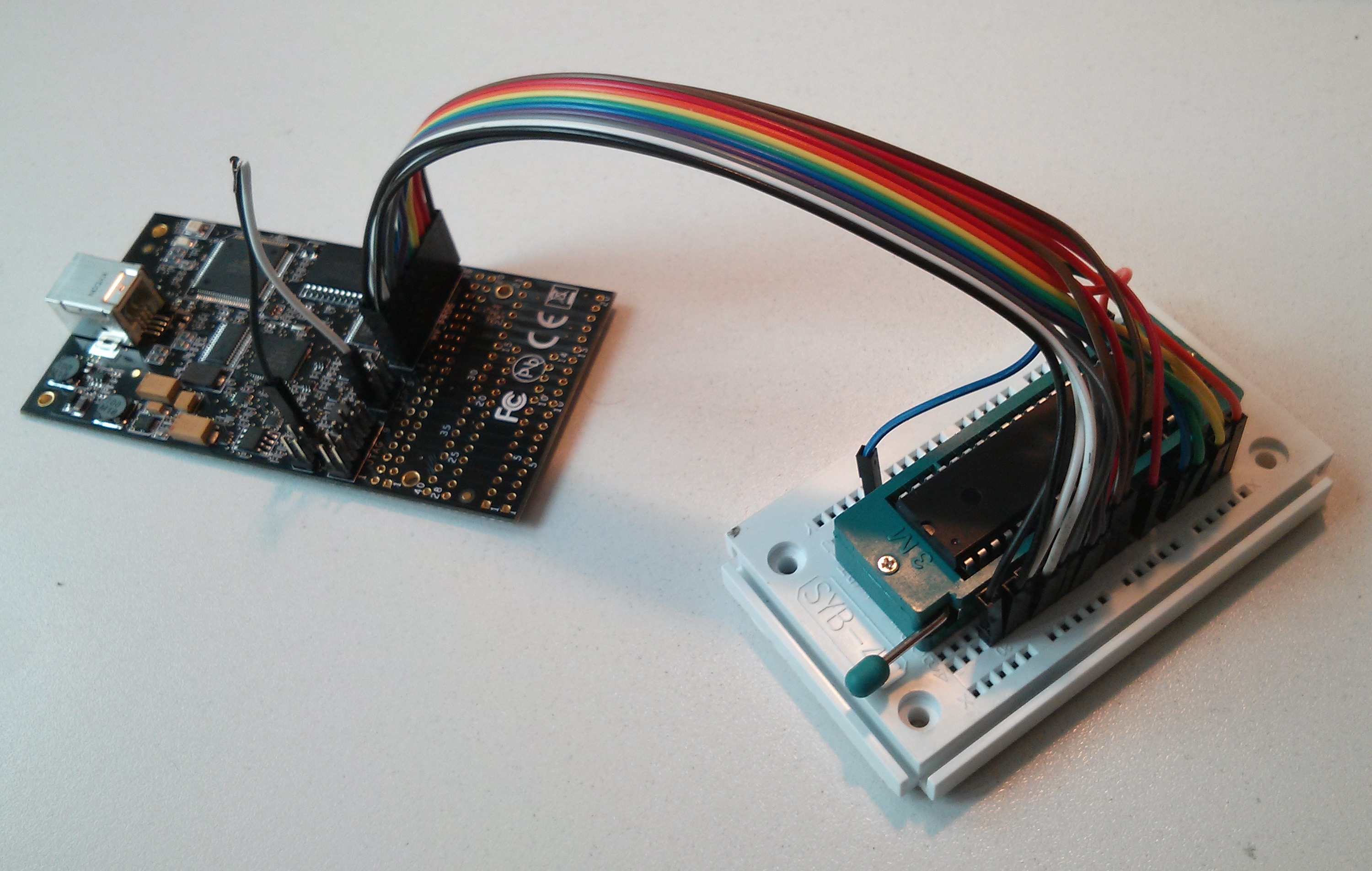
m1284p makes AVR Dragon "hang"?

OP #3156860
Rate this post
useful
not useful
Hello all,

a few days ago I bricked two ATMega1284P's trying to use the Arduino IDE 
with them (see 
http://maniacbug.wordpress.com/2011/11/27/arduino-on-atmega1284p-4/). I 
was using a USBasp clone from .cn (which worked for Arduino-on-ATTiny85, 
btw).

The following takes place under Mac OS X 10.8.3 and (later, for the 
Atmel Studio 6.1-part) Windows 7:

To unbrick I got myself an AVR Dragon and connected everything according 
to the instructions here:
http://support.atmel.no/knowledgebase/avrstudiohelp/mergedProjects/AVRDragon/SCKT3100A3.htm
(checked the wiring and "direction" of the m1284p twice). See attached 
picture.

Now, for the strange part: Inserting the m1284p into the TexTool (or the 
board directly) makes the Dragon "hang", ie. it is unresponsive.

Without the 1284 avrdude works, but of course cannot talk to a device:
1
# avrdude -c dragon_pp -p m1284p -n -v -P usb
2

3
avrdude: usbdev_open(): Found AVRDRAGON, serno: 00A20002xxxx
4
JTAG ICE mkII sign-on message:
5
Communications protocol version: 1
6
M_MCU:
7
  boot-loader FW version:        255
8
  firmware version:              7.33
9
  hardware version:              1
10
S_MCU:
11
  boot-loader FW version:        255
12
  firmware version:              7.33
13
  hardware version:              7
14
Serial number:                   00:a2:00:02:xx:xx
15
Device ID:                       AVRDRAGON
16
         AVR Part                      : ATMEGA1284P
17
         Chip Erase delay              : 9000 us
18
         PAGEL                         : PD7
19
         BS2                           : PA0
20
         RESET disposition             : dedicated
21
         RETRY pulse                   : SCK
22
         serial program mode           : yes
23
         parallel program mode         : yes
24
         Timeout                       : 200
25
         StabDelay                     : 100
26
         CmdexeDelay                   : 25
27
         SyncLoops                     : 32
28
         ByteDelay                     : 0
29
         PollIndex                     : 3
30
         PollValue                     : 0x53
31
         Memory Detail                 :
32

33
                                  Block Poll               Page                       Polled
34
           Memory Type Mode Delay Size  Indx Paged  Size   Size #Pages MinW  MaxW   ReadBack
35
           ----------- ---- ----- ----- ---- ------ ------ ---- ------ ----- ----- ---------
36
           eeprom        65    10   128    0 no       4096    8      0  9000  9000 0xff 0xff
37
           flash         65    10   256    0 yes    131072  256    512  4500  4500 0xff 0xff
38
           lock           0     0     0    0 no          1    0      0  9000  9000 0x00 0x00
39
           lfuse          0     0     0    0 no          1    0      0  9000  9000 0x00 0x00
40
           hfuse          0     0     0    0 no          1    0      0  9000  9000 0x00 0x00
41
           efuse          0     0     0    0 no          1    0      0  9000  9000 0x00 0x00
42
           signature      0     0     0    0 no          3    0      0     0     0 0x00 0x00
43
           calibration    0     0     0    0 no          1    0      0     0     0 0x00 0x00
44

45
         Programmer Type : DRAGON_PP
46
         Description     : Atmel AVR Dragon in PP mode
47
         Vtarget         : 5.0 V
48
         SCK period      : 1.00 us
49

50
avrdude: AVR device initialized and ready to accept instructions
51

52
Reading | ################################################## | 100% 0.15s
53

54
avrdude: Device signature = 0xffffff
55
avrdude: Yikes!  Invalid device signature.
56
         Double check connections and try again, or use -F to override
57
         this check.
58

59
avrdude: jtagmkII_close(): bad response to GO command: RSP_ILLEGAL_EMULATOR_MODE
60

61
avrdude done.  Thank you.

With the m1284p inserted, it goes dead on me:
1
# avrdude -c dragon_pp -p m1284p -n -v -P usb
2
avrdude: Version 5.11.1, compiled on Mar 26 2013 at 19:58:26
3
         Using Port                    : usb
4
         Using Programmer              : dragon_pp
5
avrdude: usbdev_open(): did not find any USB device "usb"

The same (though not as verbose ;) goes for Atmel Studio 6.1 under 
Windows 7.

Any ideas what I could be doing wrong?

Thank you,
 Christian.
Attached files:
OP #3157357
Rate this post
useful
not useful
To check if "everything else" works, I've tried the Dragon with an 
ATTiny13A I found under the couch; things seem to be ok with this little 
device:
1
# avrdude -c dragon_hvsp -p t13 -n -v -P usb
2

3
avrdude: Version 5.11.1, compiled on Mar 26 2013 at 19:58:26
4
(...)
5
         Using Port                    : usb
6
         Using Programmer              : dragon_hvsp
7
avrdude: usbdev_open(): Found AVRDRAGON, serno: 00A20002xxxx
8
JTAG ICE mkII sign-on message:
9
Communications protocol version: 1
10
M_MCU:
11
  boot-loader FW version:        255
12
  firmware version:              7.33
13
  hardware version:              1
14
S_MCU:
15
  boot-loader FW version:        255
16
  firmware version:              7.33
17
  hardware version:              7
18
Serial number:                   00:a2:00:02:xx:xx
19
Device ID:                       AVRDRAGON
20
         AVR Part                      : ATtiny13
21
         Chip Erase delay              : 4000 us
22
         PAGEL                         : P00
23
         BS2                           : P00
24
         RESET disposition             : dedicated
25
         RETRY pulse                   : SCK
26
         serial program mode           : yes
27
         parallel program mode         : yes
28
         Timeout                       : 200
29
         StabDelay                     : 100
30
         CmdexeDelay                   : 25
31
         SyncLoops                     : 32
32
         ByteDelay                     : 0
33
         PollIndex                     : 3
34
         PollValue                     : 0x53
35
         Memory Detail                 :
36

37
                                  Block Poll               Page                       Polled
38
           Memory Type Mode Delay Size  Indx Paged  Size   Size #Pages MinW  MaxW   ReadBack
39
           ----------- ---- ----- ----- ---- ------ ------ ---- ------ ----- ----- ---------
40
           eeprom        65     5     4    0 no         64    4      0  4000  4000 0xff 0xff
41
           flash         65     6    32    0 yes      1024   32     32  4500  4500 0xff 0xff
42
           signature      0     0     0    0 no          3    0      0     0     0 0x00 0x00
43
           lock           0     0     0    0 no          1    0      0  4500  4500 0x00 0x00
44
           calibration    0     0     0    0 no          2    0      0     0     0 0x00 0x00
45
           lfuse          0     0     0    0 no          1    0      0  4500  4500 0x00 0x00
46
           hfuse          0     0     0    0 no          1    0      0  4500  4500 0x00 0x00
47

48
         Programmer Type : DRAGON_HVSP
49
         Description     : Atmel AVR Dragon in HVSP mode
50
         Vtarget         : 5.0 V
51
         SCK period      : 1.00 us
52

53
avrdude: AVR device initialized and ready to accept instructions
54

55
Reading | ################################################## | 100% 0.15s
56

57
avrdude: Device signature = 0x1e9007
58
avrdude: safemode: lfuse reads as 6A
59
avrdude: safemode: hfuse reads as FF
60

61
avrdude: safemode: lfuse reads as 6A
62
avrdude: safemode: hfuse reads as FF
63
avrdude: safemode: Fuses OK
64
avrdude: jtagmkII_close(): bad response to GO command: RSP_ILLEGAL_EMULATOR_MODE
65

66
avrdude done.  Thank you.

The error on the last line seems to be "known and ok", see 
http://lists.gnu.org/archive/html/avrdude-dev/2009-11/msg00030.html for 
more ("The attempt to send a CMND_GO command even in ISP mode is a 
benign bug
that slipped in somehow in one of the recent releases.")

Good night,
 Christian.

Reply

Please log in before posting.

or

Log in with Google account

Registration is free and takes only a minute.

Register now