Hi

i am trying to set up Eclipse Helios SR2 to do some debugging of a ARM7
(AT91SAM7S256) board using usbprog as hardware adapter and openocd 0.4.
I think the general connection works fine, the program is written to the
SRAM, but eclipse has some problems in talking to the arm-none-eabi-gdb.
The program breaks at main() as configured, I can also do single steps
while the program execution is halted. But after I press resume, I can't
suspend the program anymore. It is also not possible to add further
breakpoints, eclipse just shows a "unresolved breakpoint". Breakpoints
added in eclipse before the launch of the program work fine...
Furthermore, pressing the stop button triggers an error message: "Target
request failed: Failed to interrupt".

I am sure the program itself is running fine after I start it, an LED is
changing brightness according to program and I can talk to my firmware
via the usb-cdc implementation. Just debugging seems to stop working.

I did some tests using semi-manual control, by starting gdb myself and
doing exactly what is written in the startup script, everything works
fine. If I press CTRL-C and then enter "monitor halt" I can stop the
program anytime and read out the registers etc. I did not try
breakpoints on the command line, I did not know how to use gdb directly
until a few hours ago. ;)
I did another test, if I launch the program using eclipse (where it is
"unstoppable" after i press on resume after the initial breakpoint) and
then manually halt the cpu (by using a telnet session to directly talk
to openocd), eclipse registers the halt and correctly shows the current
variables etc. I am also able to do single-stepping after this, if I
press resume, all control is lost again.

The technical details:
Eclipse Helios Service Release 2 using CDT and the Hardware Debugging
Plugin, latest Yagarto package including gcc 4.6 and gdb 7.2 running on
Windows 7 64 bit (my desktop machine)

self-compiled openocd 0.4.0 patched to accept the improved usbprog JTAG
firmware, running on 32 bit Ubuntu 11.10 (my notebook)

I configure eclipse to tell gdb to connect to the openocd running on the
notebook, this way I have no trouble with the !§&%§$ driver policy of MS
in their 64 bit OSes.

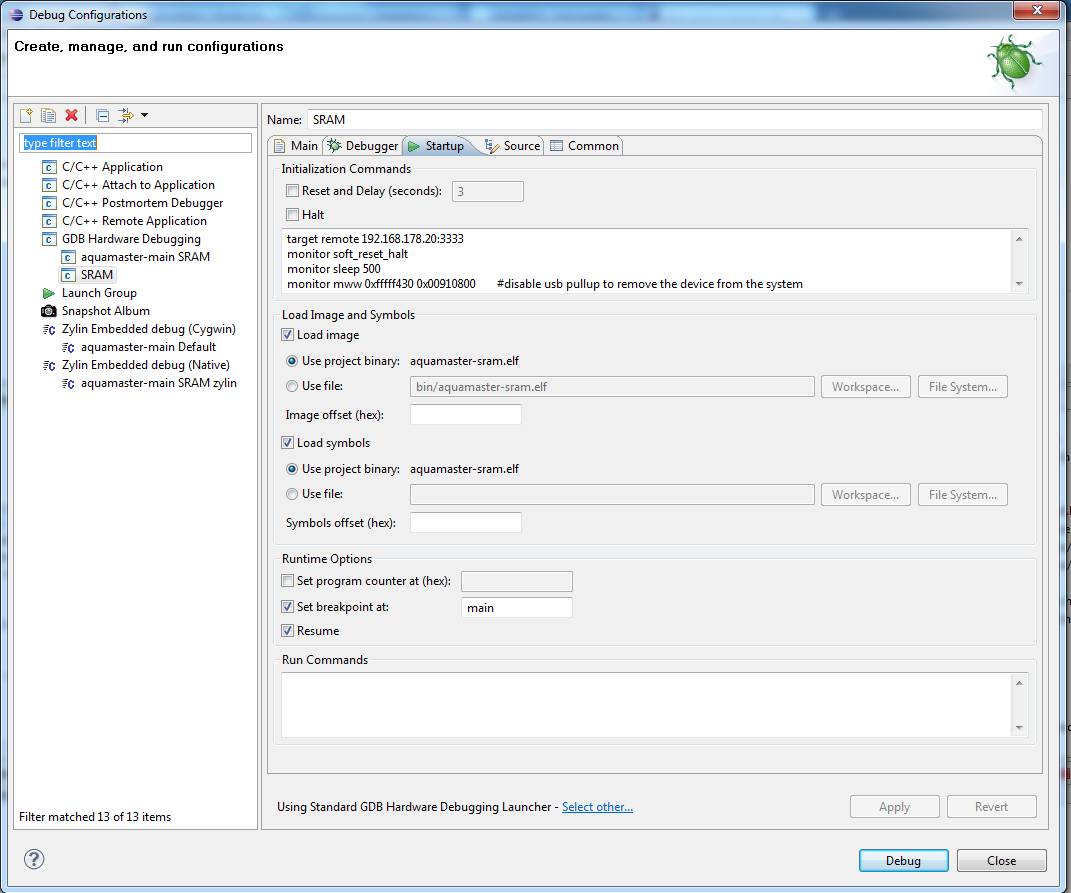
I am attaching a screenshot of my startup configuration in eclipse, on
the other tabs I changed nothing except that I point eclipse to the
arm-none-eabi-gdb.exe.

As you can see from the screenshot, I also tried to use the Zylin
plugin, using the following commands:
Initialize:
target remote 192.168.178.20:3333
Run:
monitor soft_reset_halt
monitor mww 0xfffff430 0x00910800  #disable usb pullup
monitor reg pc 0x0000000
load

The result is the same as described above.

It seems to me like eclipse somehow looses the connection to the gdb
when the program is running and can not send any more commands or
something like that, but I am clueless on how to fix this. Otherwise,
the whole gdb&openocd setup is running fine, I can upload images in
openocd, manually use the gdb and so on.

Any helpful comments are deeply appreciated, as I already wasted the
better part of today on trying to get this to work. Please tell me if I
forgot to include any details of my setup.
Attached files:
-

eclipse-config.jpg
94 KB
I began suspecting the different "bitnes" of eclipse (64) and gdb (32)
to cause the problem, and with that thought in mind some googling
revealed http://www.versaloon.com/bbs/viewtopic.php?f=2&t=656 which
seems to describe the same problem. I will try that tomorrow and report
if it is the solution.
As already suspected above, using the same bitnes of eclipse and the
toolchain solved the problem, as there is no 64bit arm-none-eabi
toolchain for windows readily available I just switched back to 32 bit
Eclipse, who needs more than 2 GB RAM per process anyway ;)
 Watch this topic
 Disable multi-page view
Please log in before posting. Registration is free and takes only a minute.
Existing account
Do you have a Google/GoogleMail account? No registration required!
Log in with Google account
Log in with Google account
No account? Register here.